
Eatr・AI Healthy Meal Plan・Diet
Eatr - MealPlansFood & Drink
4.484.00 Reviews
- Version
- 2.49.0
- Installs
- 500.00K
- Age Rating
- Everyone
Screenshots

Our Review of Eatr・AI Healthy Meal Plan・Diet
 Analysis by Appyee
For anyone who finds deciding what to eat harder than cooking, Eatr・AI Healthy Meal Plan・Diet is worth a closer look. I see its main appeal in putting meal planning, recipes and dietary preferences in one place, so you can start with a plan rather than another open-ended search for dinner ideas. That can be especially useful when your schedule, appetite or food preferences change from day to day.
Readable choices matter as much as meal ideas
The first impression is of an app designed to make the basic path easy to follow: share what you like and what you want from your eating routine, then use the resulting plan as a starting point. A clear interface helps when you are scanning meals quickly, but a tidy layout alone does not make every decision effortless. Meal names, recipe steps and nutrition information need to be easy for you to distinguish and interpret, so I would take a little time at setup to check whether the presentation works for your own reading needs.
This is a food and drink app from Eatr - MealPlans, and its focus is narrower than a general calorie counter or a recipe-search site. Instead of asking you to assemble everything from scratch, it aims to connect preferences with a meal plan and recipes. That distinction makes it easier to know what to try first: set a realistic goal, choose dietary preferences carefully and treat the first plan as a draft, not a rulebook.
Navigation and the first useful routine
The setup quiz is a practical entry point because it gives the app information to work with before you begin choosing meals. I would answer it with my ordinary week in mind rather than an idealized version of my habits. If I often eat lunch away from home, for example, a plan that assumes I cook every meal could be less useful than one that reflects the meals I can actually prepare. The more honestly I describe my routine, the more relevant the recommendations are likely to feel.
For a first week, I would avoid trying to follow every suggestion at once. Pick a couple of recipes that fit your time and kitchen, then see whether the instructions and ingredients suit you. This makes it easier to tell whether a mismatch comes from the recipe, your schedule or the plan itself. It also avoids the common meal-planning trap of buying for an ambitious menu and then abandoning it halfway through the week.
Planning around different bodies and routines
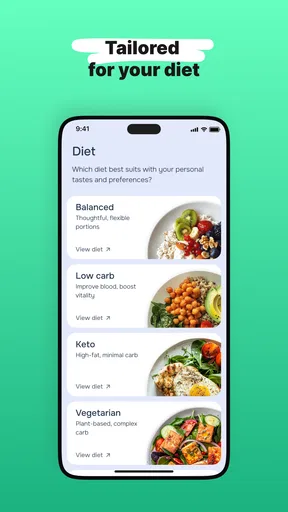
Dietary preferences and restrictions are central to the setup, which gives people with different eating patterns a way to describe what they need. I would still read each recipe rather than assuming a preference setting makes every detail safe for a particular allergy or medical requirement. For a serious restriction, the ingredient list and preparation details matter more than a personalized label, and a meal-planning app is not a substitute for advice from a qualified health professional.
There is also a useful distinction between wanting general structure and needing precise nutrition management. If you simply want help deciding what to cook and building a steadier routine, a suggested plan can reduce daily friction. If your needs depend on exact nutrient targets or clinical guidance, I would use the app only alongside a trusted professional plan and check every relevant detail before relying on a recommendation.
Using it when attention, movement or senses vary
Meal planning can be a helpful support when decision-making is tiring: having a few options ready may reduce the number of choices between getting home and eating. The same convenience can matter on busy days, when there is little time to compare recipes. I would save the plan as a prompt for the next decision, not as another task to complete perfectly. A skipped meal or a changed schedule should be a reason to adjust, not a reason to feel that the whole plan has failed.
Cooking instructions can also be easier to use when they are broken into manageable steps, particularly if you are new to a dish. In practice, I would check the full recipe before starting so I know what equipment and preparation it expects. That small habit can help if you have limited time, find switching between steps difficult, or prefer to prepare ingredients in one go. Anyone who needs larger text, screen-reader support, voice control or other specific access tools should check how the app works with their device and preferences before making it part of a daily routine.
Everyday access beyond the kitchen
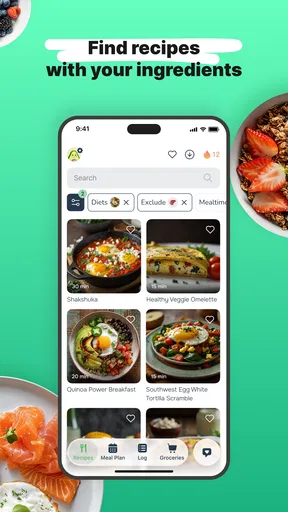
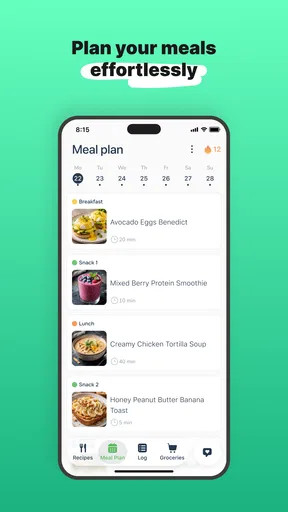
A realistic use case is arriving home late with groceries already in the kitchen but no plan for dinner. Rather than scrolling through unrelated recipe results, I would open the meal plan, choose a recipe that fits the time and ingredients I have, and use its steps to get moving. The benefit is not that an app can make a hectic evening calm; it is that it can shorten the gap between “What should I eat?” and a workable choice.
That workflow depends on the plan matching real life. If your week includes shared meals, unpredictable shifts or limited access to a kitchen, be selective about which suggestions you adopt. You may get more value by using a plan for a few meals and leaving room for leftovers or meals prepared by someone else. A flexible routine is more sustainable than treating every planned dish as an obligation.
Where it sits among food apps
Compared with a broad recipe search, Eatr’s draw is the attempt to organize ideas around your preferences instead of making you filter a large collection yourself. Compared with a conventional food log, its meal-planning focus can put the next meal first rather than centering the experience on recording what you have already eaten. That difference will appeal to people who want prompts and recipes; it may be less compelling for someone who already has a reliable rotation of meals or mainly wants to track nutrition with precision.
The app is free to download, with in-app purchases ranging from $4.99 to $99.99 per item. I would explore the basic planning experience before paying for anything and make sure the available options suit the way I intend to use it. Its average rating is 4.4 from around 35,000 ratings, and it has over 500,000 installs. Those figures suggest that it has found an audience, but they do not tell you whether its approach will match your preferences or access needs.
The app is rated for Everyone and was released on March 17, 2025. Version 2.49.0 requires Android 7.0 or later. For iPhone users, I would check the relevant store’s compatibility details before installing. The practical question is whether the app works comfortably on your device and whether its plan fits your day, not just whether it can be downloaded.
One small but useful habit is to treat the first recommendations as a test run. Note which meals you would genuinely cook, which ingredients are inconvenient, and which steps feel unclear. Then use those observations to refine your choices rather than forcing yourself through a plan that looks healthy on screen but is awkward in your kitchen. This gives you a more honest measure of usefulness than judging it by how appealing the first set of suggestions seems.
I would recommend trying it if you want help turning food preferences into a practical set of meal ideas, especially if deciding what to cook is the part that usually derails your routine. I would skip it, or pair it with another tool, if you need verified clinical nutrition guidance, depend on specialized accessibility controls that you have not tested, or prefer to choose and track every detail yourself. The best result is a plan that supports your choices without taking them over.
Hey there! So, I’ve recently tried out this app called Eatr・AI Healthy Meal Plan・Diet, and I’ve got to say, it’s quite the game changer for anyone looking to up their nutrition game with a little help from technology. Let’s dive into what makes this app tick and whether it’s worth a spot on your home screen.
Getting Started with Eatr
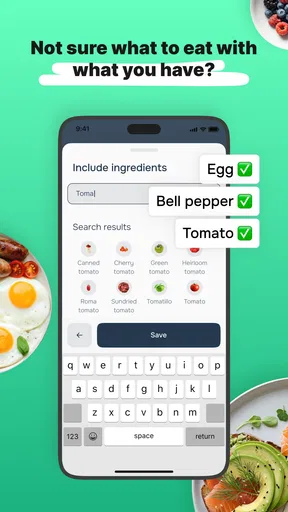
First off, setting up Eatr is a breeze. Once you download it, the app kicks things off with a straightforward quiz that asks about your dietary preferences, goals, and any restrictions you might have. Whether you’re vegan, gluten-free, or just trying to eat healthier, Eatr has got you covered.
The user interface is clean and intuitive, which is always a plus. It’s like having a friendly nutritionist right in your pocket, guiding you through meal planning without any of the usual stress. I personally love how it asks about your favorite foods and tries to incorporate them into your meal plans. It doesn’t feel rigid or like a one-size-fits-all approach.
AI-Powered Meal Planning
Once you’re set up, Eatr gets to work by generating personalized meal plans. The AI behind the app is quite impressive. It considers your preferences and nutritional needs and then whips up a plan that’s both healthy and tasty. I mean, who knew AI could be so good at cooking?
The app offers a variety of meal options, and each comes with recipes that even a beginner can tackle. I tried a few dishes, and they were not only delicious but also easy to prepare. If you’re like me and sometimes find cookbooks intimidating, you’ll appreciate the step-by-step guides Eatr provides.
Tracking and Adjustments
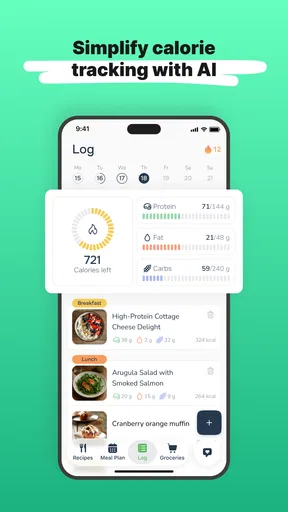
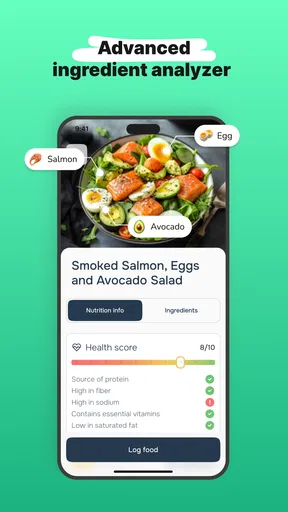
Eatr isn’t just about planning meals; it also helps you track your progress. You can log your meals, monitor your calorie intake, and adjust your plans as needed. The app’s dashboard gives a clear overview of your nutritional intake, which is super helpful for staying on track.
What’s really neat is that the app learns from your inputs. If you skip meals or enjoy a meal more than others, Eatr takes note and adjusts future plans. It’s like having an AI that’s constantly learning about your taste buds!
Community and Support
Eatr also has a community feature where you can connect with other users. Sharing tips, recipes, or just getting some motivation from fellow health enthusiasts can make a big difference. Plus, the app provides regular updates and tips from nutrition experts, which is a nice touch.
There’s also a support feature if you encounter any hiccups or have questions. The team behind Eatr is quite responsive, ensuring that you’re never left in the dark.
Final Thoughts
All in all, Eatr is a fantastic tool for anyone looking to improve their eating habits without the hassle. It’s user-friendly, adaptive, and makes healthy eating feel less like a chore and more like an adventure.
If you’re looking to shake up your diet, or just need a little help staying on track, I’d definitely recommend giving it a try. With Eatr, you’ve got nothing to lose and a whole lot of delicious meals to gain!
Verdict
Strengths of Eatr・AI Healthy Meal Plan・Diet
- Customizable meal plans to fit dietary needs.
- AI suggestions for new recipes daily.
- Easy-to-use interface with intuitive navigation.
- Tracks nutritional intake effectively.
- Integrates with fitness apps for holistic health.
Limitations of Eatr・AI Healthy Meal Plan・Diet
- Limited offline functionality.
- Some features locked behind a paywall.
- Occasional recipe inaccuracies.
- Requires account creation for full access.
- AI suggestions can be repetitive.
Similar Picks in This Category
View All
Rappi: Food Delivery, Grocery
Rappi, Inc - Delivery3.5

McDonald’s: Cupons e Delivery
Arcos Dorados4.3

Swiggy: Food Instamart Dineout
Swiggy4.7

Blinkit: Groceries & more
Blinkit4.8

foodpanda: food & groceries
Foodpanda GmbH a subsidiary of Delivery Hero SE4.0

Zomato: Food Delivery & Dining
Zomato4.7
Frequently Asked Questions
What is Eatr and how does it work?
Eatr is an AI-driven app designed to help users create personalized healthy meal plans. It analyzes your dietary preferences, restrictions, and goals to suggest nutritious meals. The app also includes features like grocery lists and nutrition tracking to streamline the meal planning process.
Can Eatr accommodate specific dietary restrictions?
Yes, Eatr is designed to cater to various dietary restrictions, including vegan, vegetarian, gluten-free, and more. Users can input their specific needs, and the app will generate meal plans that align with those requirements, ensuring a personalized and inclusive experience.
Is Eatr suitable for weight loss or muscle gain goals?
Absolutely, Eatr can be tailored to support weight loss, muscle gain, or maintenance. By entering your fitness goals, the app provides meal plans with appropriate calorie and macronutrient targets to help you achieve your desired results effectively and healthily.
Does Eatr offer grocery shopping assistance?
Yes, Eatr simplifies grocery shopping by providing automatically generated shopping lists based on your meal plans. This feature ensures you have all necessary ingredients on hand, saving you time and helping you stick to your meal plan without unnecessary purchases.
Is there a subscription fee for Eatr?
Eatr typically offers a free version with basic features, while a subscription provides access to premium features such as advanced meal customization and exclusive recipes. Pricing details can vary, so it’s recommended to check the app store for the latest subscription options and costs.
